


Tags
Share
AEM Audit Log is a convenient way to check who modified what and when within AEM pages or assets.
ACS Commons provides an Audit Log Search tool which allows users to do an AEM Audit Log search and see what properties of a page (and enclosed components) have been altered.
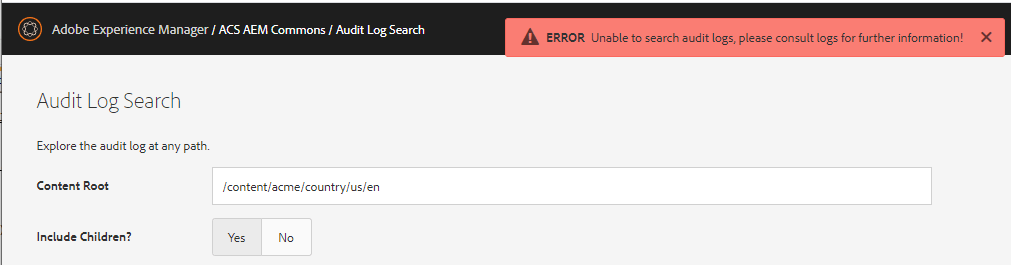
But what if you don’t have access to ACS Commons in your Production environment or it doesn’t work as expected (see Pic. 1 below), but you still need to know what has been changed on a particular page? This article will show you how to find out in two steps:
Step #1. Navigate to audit log events in CRXDE.
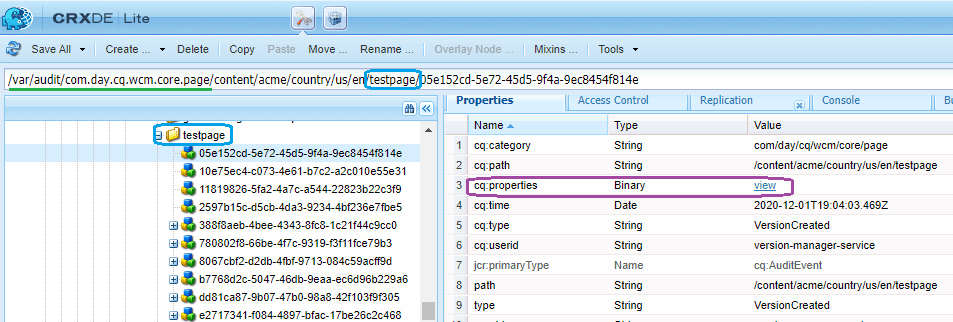
AEM Audit Log entries for pages are located under the:
/var/audit/com.day.cq.wcm.core.page
folder in the repository. An example for project ‘acme’ and page ‘testpage’ is in Pic. 2 below.
Log entries can also be found and sorted by date using the following SQL2 query (works in AEM 6.4 and older; AEM 6.5 returns an empty result set).
SELECT * FROM [cq:AuditEvent] AS comp WHERE ISDESCENDANTNODE(comp, '/var/audit/com.day.cq.wcm.core.page/content/acme/country/us/en/testpage') order by comp.[cq:time]
Step #2. Deserialize a binary with modified properties.
An AEM Audit Log entry contains information on what exactly was modified in a page and its enclosed components. A set of modified properties can be retrieved from the ‘cq:properties’ field.
We need to click the ‘view’ link (in the purple oval in Pic. 2 above), download the binary, and run the following Java program:
public class ChangedProps {
    public static void main(String[] args) throws Exception {
        File file = new File("C:UsersdenisDownloadscq_properties");
        InputStream is = new FileInputStream(file);
        ObjectInputStream ois = new ObjectInputStream(is);
        ois.readInt();
        while (ois.available() != -1) {
            try {
                Object obj = ois.readObject();
                if (obj instanceof HashSet) { //we found a hash set with modified properties
                    Set<string> propertiesSet = (Set<string>) obj;
                    for (String property : propertiesSet) {
                        System.out.println(property);
                    }
                    break; //no need to parse the rest
                }
            } catch (Exception e) {
                e.printStackTrace();
            }
        }
        is.close();
    }
}
</string></string>
The code is based on Audit Log Search Servlet from ACS Commons, so the program will print a list of modified properties similar to the console:
jcr:content/parsys/testComponent/cq:lastRolledoutBy
jcr:content/parsys/testComponent/description
jcr:content/parsys/testComponent/jcr:lastModified
Now we know which particular properties were modified and captured as an AEM Audit Log Event!
Author: Denis Glushkov