


Tags
Share
In this next post on AEM Experience Fragments, we’ll discuss the overall architecture by looking at these three aspects:
- Content model
- Templates
- Rendering HTML output
Experience Fragments are regular pages with specific resource types and templates. They should be stored in /content/experience-fragments.
The XF page consists of 2 parts: a parent page and one or more variation pages.
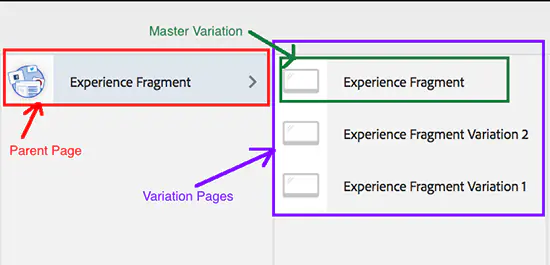
The XF parent page has no actual content and serves to logically combine its variations. Its resource type is cq/experience-fragments/components/experiencefragment. An XF variation page is a subpage of the parent page. Its resource type is cq/experience-fragments/components/xfpage or its subtypes.
The master variation is created automatically when XF is created. It cannot be deleted unless the whole XF is deleted. To distinguish the master variation among the other variations, this JCR property is used:
cq:xfMasterVariation = trueHere are some notable JCR properties for variations: -cq:xfShowInEditor = true/false controls whether the variation will be shown in the asset side panel -cq:xfSocialVariation = true/false is used to filter out “social” variations (Facebook, Pintrest) from the various admin UI elements -cq:xfVariantType = web/facebook/pintrest is used to distinguish the variation’s intended use -cq:xfMasterVariation is used to mark “master” variation
Templates
Templates are used to create variations just as with regular AEM page OOTB (out of the box) templates:
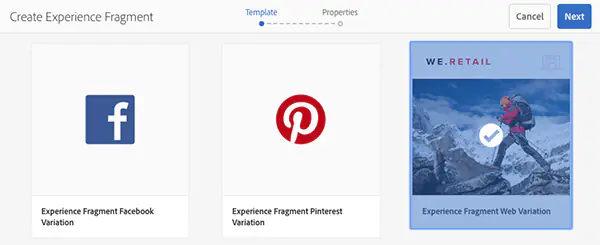
- Web templates are based on an HTML5 web templates to create web variations
- ”Social” variation templates exist for Facebook and Pintrest
For experience fragments, only editable templates can be used, static templates are not fully compatible. Editable templates, which in turn are defined by editable template types and an AEM page component implementation, define the allowed AEM components that can be used to compose an Experience Fragment. The experience fragment is an instance of an editable template that represents a logical experience. Experience fragment variations adhere to the editable template, but represent differences in experience (content and design).
To create an experience fragment template that is detected by the Create Experience Fragment wizard, you must follow one of these scenarios.
Scenario #1
- The resource type of the template (the initial node) must inherit from
cq/experience-fragments/components/xfpage - And the name of the template must begin with “experience-fragments”.
This allows users to create experience fragments in /content/experience-fragments as the cq:allowedTemplates property of this folder includes all the templates that have names beginning with “experience-fragment”. Customers can update this property to include their own naming scheme or template locations.
Scenario #2
- Add the template details manually in cq:allowedTemplates on the
/content/experience-fragmentnode.
Creating our own template type and a rendering component will be described in our next article.
Rendering HTML Output
We can directly expose an experience fragment variation as “plain HTML.” Using the .plain. selector in the URL, you can access the plain HTML rendition. This is available from the browser, but its primary purpose is to allow other applications like third-party web apps or custom mobile implementations to access the content of the experience fragment directly, using only the URL (for example, /content/experience-fragments/xf/xf.plain.html)
The rendering is controlled by the Experience Fragments HTML rendering output processor service, which is configured just like any other OSGI service.
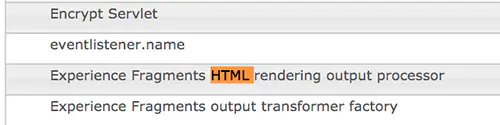
Configurable Properties
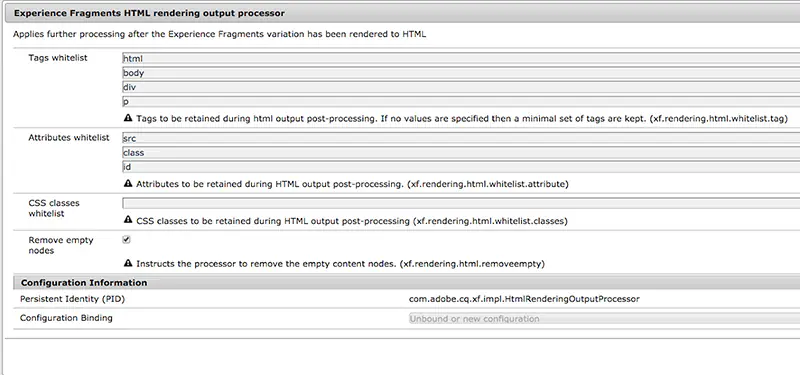
Tags whitelist
xf.rendering.html.whitelist.tag defines which tags are not stripped from the resulting HTML (common HTML tags are specified by default).
Attributes whitelist
xf.rendering.html.whitelist.attribute defines which attributes are not stripped from the resulting HTML (defaults to src, class, and id).
CSS classes whitelist
xf.rendering.html.whitelist.classes defines which classes are not stripped from the resulting HTML (no defaults).
Remove empty nodes
xf.rendering.html.removeempty, if true, instructs the processor to remove empty HTML nodes.
Stay tuned for our next post on XF where we dive into even more detail.
Author: Iryna Ason