


Tags
Share
We recently began the process of switching over all of our pages from static to editable templates. This was shaping up to be a long, complicated, and expensive process, so we turned to AEM Modernization Tools for a solution.
AEM Modernization Tools makes customization easy by providing a broad range of pre-set options that we combined to fit our needs. The tool suite is also designed to be extendable which allowed us to specify custom implementations when the framework did not provide us with quite enough flexibility. We also had the option to extend the feature set by registering OSGi services and implementing specific API interfaces.
We will not dive into AEM Modernization tools in detail; instead we will show you how to create a custom implementation to fit your own needs by answering some frequently asked questions about AEM Modernization custom solutions.
Before starting, you should make sure you’ve installed the AEM Modernization Tools package: https://github.com/adobe/aem-modernize-tools
Why did we need to customize AEM Modernization Tools?
- You might assume that all static pages will be structured correctly, but we discovered that some of our pages were missing several components which were supposed to be parts of the editable template. We also discovered that after conversion some extra components that we didn’t want appeared on the page. We decided to exclude these pages from the conversion process. Still, as a precaution, we checked the accuracy of the structure before converting each page.
- The standard PageStructureConverter implementation will move all the nodes under jcr:content to root. This would not work for us because we had several nodes under jcr:content which are a part of page properties configuration, and we wanted to keep them where they were.
How did we customize AEM Modernization Tools for our site?
- First, we added the new dependency into our pom.xml:
<dependency>
   <groupid>com.adobe.cq</groupid>
   <artifactid>aem-modernize-tools</artifactid>
   <scope>provided</scope>
   <version>1.0.0</version>
</dependency>- In order to have our custom converter, we implemented PageStructureRewriteRule:
@Component(
       immediate = true,
       configurationPolicy = ConfigurationPolicy.REQUIRE,
       service = {PageStructureRewriteRule.class, StructureRewriteRule.class}
)
@ServiceVendor("Site.com")
@ServiceDescription("Editable Template Converter")
@Designate(factory = true, ocd = EditableTemplateConverter.EditableTemplateConverterConfig.class)
public class EditableTemplateConverter implements PageStructureRewriteRule {- We decided to use a simpler configuration than the standard factory by:
- Keeping staticTemplate, editableTemplate, and slingResourceType fields the same as in PageRewriteRule
- Skipping the component order configuration and relying on the order in the initial part of an editable template
- Skipping “components to remove”
- Introducing a new section called “components mapping” where we can list out mappings in the appropriate format [old_component_rel_path:new_component_rel_path]
@ObjectClassDefinition(name = "Editable Template Converter")
public @interface EditableTemplateConverterConfig {
   @AttributeDefinition(name = "Static Template", description = "Static Template")
   String static_template();</p>
<p>   @AttributeDefinition(name = "Editable Template", description = "Editable Template")
   String editable_template();</p>
<p>   @AttributeDefinition(name = "Sling Resource Type", description = "Sling Resource Type")
   String sling_resourceType();</p>
<p>   @AttributeDefinition(name = "Components to move", description = "Components to move")
   String[] move_components();
}
When we implemented PageStructureRewriteRule, we needed these methods:
@Override
public String getStaticTemplate() {
// return static template path, it will be used by AEM modernize tool itself on whether to // show the item in the console or not
}

@Override
public boolean matches(Node node) throws RepositoryException {
// whether a page fits some initial conditions to convert
}

@Override
public Node applyTo(Node jcrRoot, Set<node> set) throws RewriteException, RepositoryException {
//place conversion logic itself here
}
</node>
How exactly did we implement the new solution?
- We returned our staticTemplate field (basically the same as in PageRewriteRule):
@Override
public String getStaticTemplate() {
   return staticTemplate;
}- matches() method was also basically the same; we just checked the cq:template property:
@Override
public boolean matches(Node node) throws RepositoryException {
   if (!node.hasProperty(PN_TEMPLATE)) {
       return false;
   } else {
       String template = node.getProperty(PN_TEMPLATE).getString();
       return StringUtils.equals(getStaticTemplate(), template);
   }
}- The method applyTo() was responsible for the conversion itself
- Before conversion, we created a version as a precaution
- We changed the cq:template property
- We moved nodes under root
- We reordered nodes to match the template
@Override
public Node applyTo(Node jcrRoot, Set<node> set) throws RewriteException, RepositoryException {

   createPageVersion(jcrRoot);

   if (jcrRoot.hasProperty(PN_DESIGN_PATH)) {
       jcrRoot.getProperty(PN_DESIGN_PATH).remove();
   }

   Node initialStructure = getInitNode(jcrRoot.getSession());

   changeTemplate(jcrRoot);
   moveStructure(jcrRoot, initialStructure);

   return jcrRoot;
}
</node>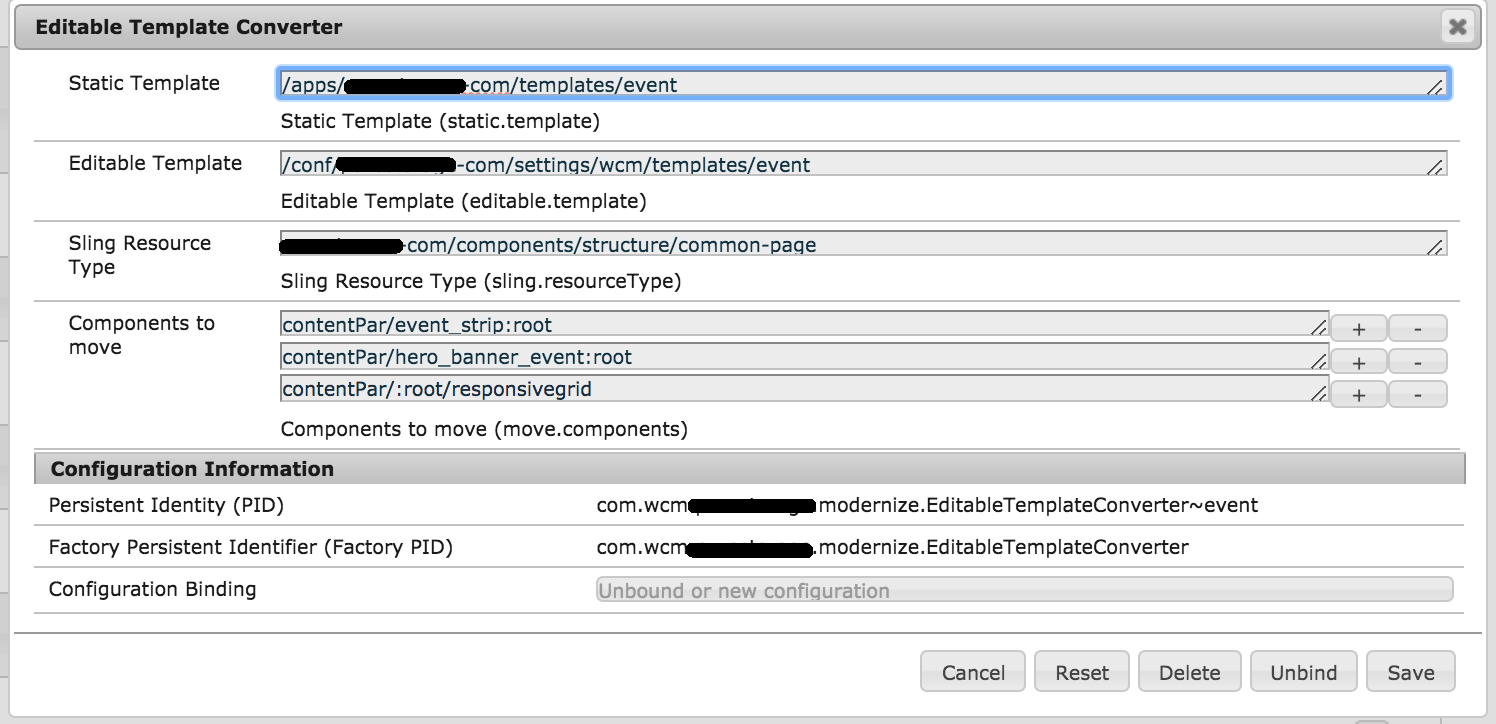
We also needed the corresponding xml config file (we should have a separate config file for every template):
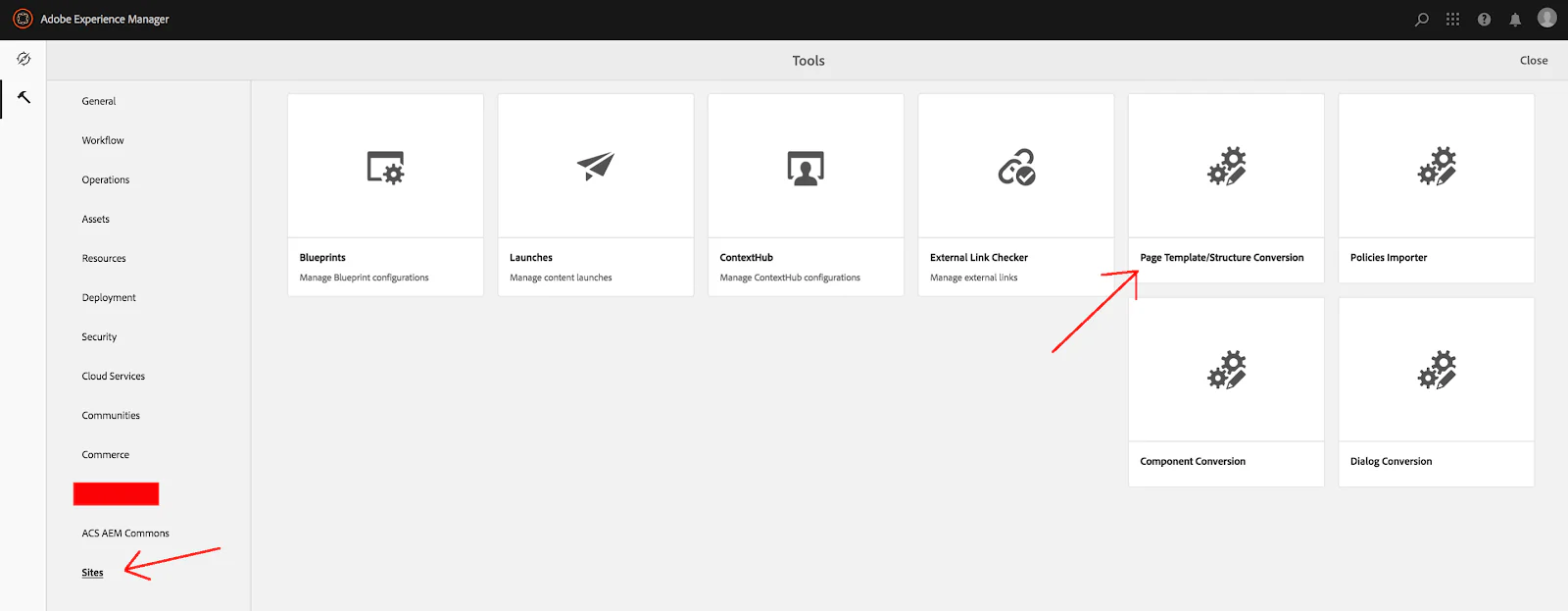
How did we use AEM Modernizing Tools?
This is the AEM Modernizing tool console:
Author: Iryna Ason





.png)