


Table of Contents
Tags
Share
You can push an Experience Fragment (XF) to an endpoint by using, for example, the 3rd party’s API (e.g. Facebook / Pinterest). A 3rd party can also pull an XF from AEM. Every XF has a unique URL that can be embedded/used. Embedding an HTML XF can be achieved by using an <iframe> or with web components.
Currently, AEM supports HTML ootb (for Adobe Target HTML and JSON offers are supported) but you can implement any format (e.g. image, json, etc.). In addition, you can use the “plain” selector to get just HTML. You can configure the “Experience Fragments HTML rendering output processor” to render specific tags, attributes, and classes:
- Go to http://localhost:4502/system/console/configMgr
- Find “Experience Fragments HTML rendering output processor”
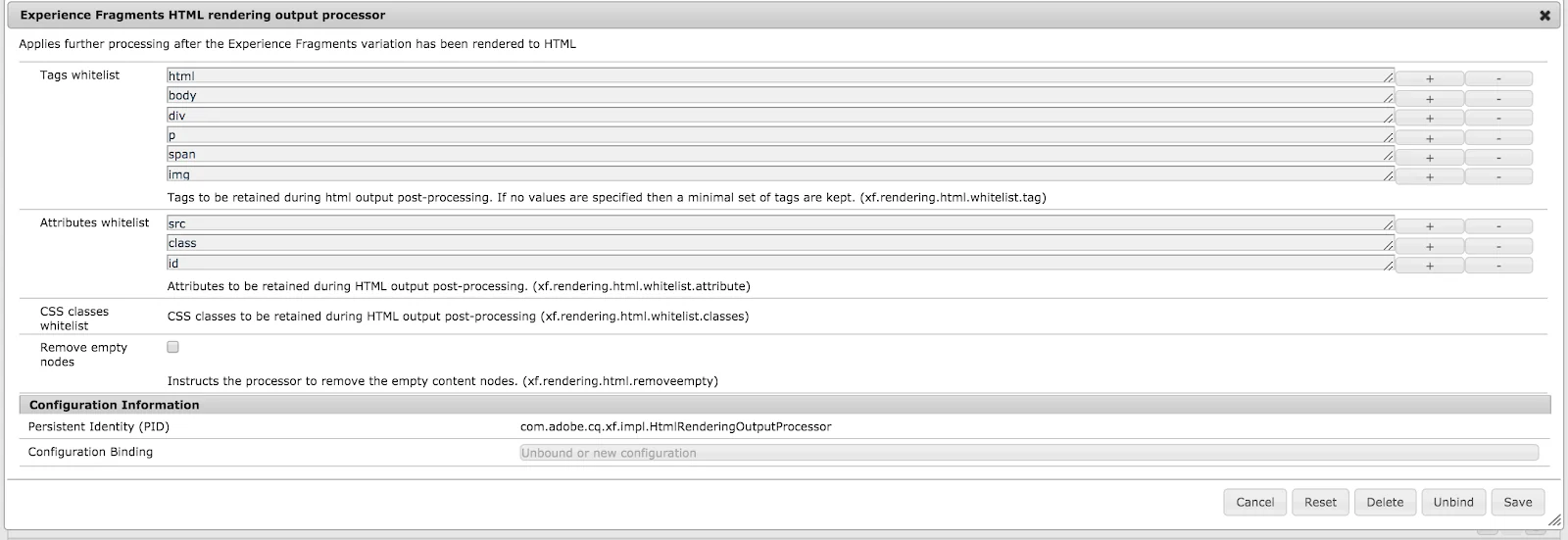
There’s another way to consume an XF on an external page. We can implement a servlet which grabs all the necessary libs (js, css, fonts, etc.) as well as as the XF content and puts them into your page.
Code example:
A simple servlet which scavenges XF content, the needed js, css and wraps them into a json object.
@Component(
       immediate = true,
       service = Servlet.class,
       property = {
               "service.description=Simple Servlet",
               "service.vendor=Site.com",
               SLING_SERVLET_RESOURCE_TYPES + "=site-com/page/xf",
               SLING_SERVLET_EXTENSIONS + "=js"
       }
)
@Designate(ocd = XFJSServlet.XFJSServletConfig.class)
public class XFJSServlet extends SlingSafeMethodsServlet {

   private static final String JQUERY_LIB = "/etc.clientlibs/clientlibs/granite/jquery.js";

   @ObjectClassDefinition(name = "XF JS Servlet")
   public @interface XFtJSServletConfig {
   }

   @Reference
   private RequestResponseFactory requestResponseFactory;

   @Reference
   private SlingRequestProcessor requestProcessor;

   @Reference
   private HtmlLibraryManager htmlLibraryManager;

   @Reference
   private Externalizer externalizer;

   @Reference
   private SlingSettingsService settingsService;

   private boolean isPublish = false;

   @Activate
   protected void activate(ExperienceFragmentJSServletConfig config) {
       if(settingsService.getRunModes().contains(Externalizer.PUBLISH)) {
           this.isPublish = true;
       }
   }

   @Override
   protected void doGet(@Nonnull SlingHttpServletRequest request, @Nonnull SlingHttpServletResponse response) throws ServletException, IOException {
       PrintWriter out = response.getWriter();

       response.setContentType("application/javascript");
       JsonObject xfJson = new JsonObject();

       xfJson.addProperty("reqJquery", getLink(request, JQUERY_LIB));

       // get page clientlibs
       xfJson.add("cssLibs", getMainLibraries(request, LibraryType.CSS, "pagelibs", "pagelibs-critical"));
       xfJson.add("jsLibs", getMainLibraries(request, LibraryType.JS, "pagelibs"));

       getPageClientLibsContent(request);

       // get html
       String contentHtml = getPageContentHtml(request);
       contentHtml = contentHtml.replace(""/content", String.format(""%1$s", getLink(request, "/content")));
       String formattedString = new String(Base64.getEncoder().encode(contentHtml.getBytes()));
       xfJson.addProperty("content", formattedString);

       out.print("var xfDeliveryObj = " + xfJson + ";");
       out.print(getXfDeliveryJs());

   }

   private JsonElement getMainLibraries(SlingHttpServletRequest request, LibraryType libraryType, String ... categories) {
       Collection<clientlibrary> libraries = htmlLibraryManager.getLibraries(categories, libraryType, true, true);
       JsonArray cssLibs = new JsonArray();
       for (ClientLibrary library : libraries) {
           cssLibs.add(new JsonPrimitive(getLink(request, library.getPath() + libraryType.extension)));
       }

       return cssLibs;
   }

   private void getPageClientLibsContent(SlingHttpServletRequest request) {

       Page page = request.getResource().adaptTo(Page.class);
       Designer designer = request.getResourceResolver().adaptTo(Designer.class);
       Design pageDesign = null;

       // traverse up to find design path
       while (page != null && (pageDesign = designer.getDesign(page)) == null) {
           page = page.getParent();
       }

       // default if not design path is set
       if (pageDesign == null) {
           pageDesign = designer.getDesign(Designer.DEFAULT_DESIGN_PATH);
       }
   }

   private String getPageContentHtml(SlingHttpServletRequest request) throws ServletException, IOException {
       Resource xfResource = request.getResource();

       String resourcePath = xfResource.getPath() + ".min.html";
       HttpServletRequest req = requestResponseFactory.createRequest("GET", resourcePath);

       WCMMode.DISABLED.toRequest(req);

       ByteArrayOutputStream reqOut = new ByteArrayOutputStream();
       HttpServletResponse resp = requestResponseFactory.createResponse(reqOut);

       requestProcessor.processRequest(req, resp, request.getResourceResolver());

       return reqOut.toString();
   }

   private String getXfDeliveryJs() {
       Collection<clientlibrary> libraries = htmlLibraryManager.getLibraries(new String[]{"site.xf-js"}, LibraryType.JS, true, true);
       StringWriter jsContentString = new StringWriter();
       for (ClientLibrary library : libraries) {
           HtmlLibrary htmlLib = htmlLibraryManager.getLibrary(LibraryType.JS, library.getPath());
           try {
               IOUtils.copy(htmlLib.getInputStream(), jsContentString, "UTF-8");
           } catch (IOException e) {
           }
       }

       return jsContentString.toString();
   }

   private String getLink(SlingHttpServletRequest request, String relativePath) {
      return isPublish() ? externalizer.publishLink(request.getResourceResolver(), relativePath) :
              externalizer.authorLink(request.getResourceResolver(), relativePath);
   }

   public boolean isPublish() {
       return isPublish;
   }
}
</clientlibrary></clientlibrary>
A custom js lib which consumes json provided by the servlet and renders it:

.content.xml:
<!--?xml version="1.0" encoding="UTF-8"?-->
<jcr:root xmlns:cq="http://www.day.com/jcr/cq/1.0" xmlns:jcr="http://www.jcp.org/jcr/1.0" jcr:primarytype="cq:ClientLibraryFolder" categories="[site.xf-js]"></jcr:root>

Index.js:
(function(){
   console.log(xfDeliveryObj);
   var jqueryLib = xfDeliveryObj.reqJquery;

   var current = document.currentScript.parentNode;

   if (typeof jQuery === 'undefined') {
       current.appendChild(createScript(jqueryLib));
   }

   xfDeliveryObj.cssLibs.forEach(function(lib){
       current.appendChild(createStyle(lib));
   });

   xfDeliveryObj.jsLibs.forEach(function(lib){
       current.appendChild(createScript(lib));
   });

   current.insertAdjacentHTML("beforeEnd", b64DecodeUnicode(xfDeliveryObj.content));

   function createScript(link) {
       var el = document.createElement("script");
       el.src = link;
       return el;
   }

   function createStyle(link) {
       var el = document.createElement("link");
       el.rel = 'stylesheet';
       el.href = link;
       return el;
   }
   function b64DecodeUnicode(str) {
       return decodeURIComponent(Array.prototype.map.call(atob(str), function(c) {
           return '%' + ('00' + c.charCodeAt(0).toString(16)).slice(-2)
       }).join(''))
   }
})();
After that we can easily put an XF in an external page:
<title>xf_test</title>


<div>
   <div>External Content</div>
       <script src="https://www.site.com/content/experience-fragments/site-com/xf/xf.js"></script>
</div>
Author: Iryna Ason