


Table of Contents
Tags
Share
This article is an introduction to a series of posts about using AEM content fragments (CF) in real life and all the potential problems you might encounter with AEM content fragments. I won’t dive too deep into the theory around CF, since Adobe’s documentation is quite exhaustive about AEM content fragments. I’ll point out some very basic info, and in further articles, we will take a look at practical applications.
What are AEM Content Fragments?
Adobe Experience Manager Content Fragments or AEM Сontent Fragments allow us to manage page-independent content. AEM Content Fragments help us prepare content for use in multiple locations/over multiple channels. These are text-based editorial content that may include some structured data elements that are considered pure content without design or layout information. AEM Content Fragments are intended to be used and reused across channels.
Usage of AEM Content Fragments
- Highly-structured data-entry/form-based content
- Long-form editorial content (multi-line elements)
- Content managed outside the life cycle of the channels delivering it
Some usage examples:
- Disclaimers
- Footnotes
- Common content (like an employee or product brief)
- Time-sensitive content
Anything that needs to be authorable and displayed in multiple locations across the site is a potential candidate for AEM Content Fragments.
AEM Content Fragments architecture
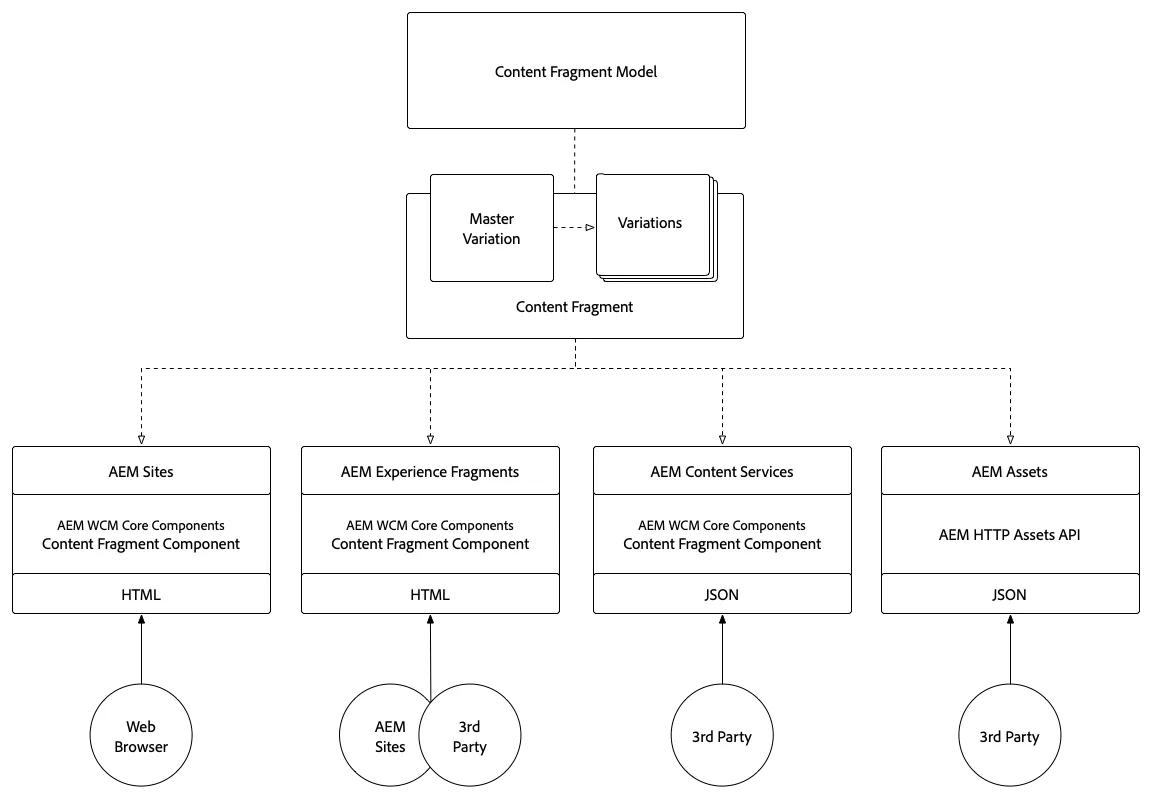
The following diagram illustrates the overall architecture for AEM Content Fragments:
Content Fragment Types
Content Fragments can be:
- Simple Fragments. They have no predefined structure and contain only text and images. These are based on AEM Content Fragment Models.
- Fragments that contain structured content. These are based on a Content Fragment Model, which predefines a structure for the resulting fragment.
Content Type
- AEM Content fragments are stored as Assets
- Content fragments (and their variations) can be created and maintained from the Assets console
- AEM content fragments are authored and edited in the Content Fragment Editor
- They are used in the page editor by means of the Content Fragment component in AEM (referencing component)
Metadata
CF Metadata can be created when you create and author AEM Content Fragments. Later, you can update them by viewing/editing the fragment properties from the console or by editing the Metadata when in the fragment editor.
CF Master and Variations
CF Master is an integral part of AEM content fragments. Every content fragment has one Master instance, which cannot be deleted. Master is accessible in the fragment editor under Variations.
Note: Master is not a variation as such, but is the basis of all variations.
CF Variations are renditions of fragment text that have a specific editorial purpose, which can (but does not have to) be related to the channel. CF Variations can also be for ad hoc local modifications. They are created as copies of the Master, but can be edited as required. Variations can be synchronized with the Master if the Master content has been updated. They are available under the Variations tab of the fragment editor.
AEM Content Fragment Models
Content Model is required to create a structured fragment. AEM content fragment models define the structure of a fragment (title, content elements, etc.). Content Model definitions require a title and one data element; everything else is optional. The model defines a minimal scope of the fragment and default content if applicable. Authors cannot change the defined structure when authoring AEM content fragments.
Conclusion
This was a quick review of AEM Content Fragments. It would be impossible to cover every bit of information about AEM Content Fragments in one article, so the next articles in this series will be about CF customization and applications.
Author: Iryna Ason