


Table of Contents
Tags
Share
In our previous articles we have prepared a custom CF model, created a CF structure, and configured its translation. In this article we’ll take a look at CF content localization.
A New AEM Content Fragment Translation Project
A translation project helps organize and manage AEM Content Fragment translation within Adobe Experience Manager and acts as a container for similar translation jobs. We can use a project to create translation jobs for an entire site, an entire directory, or a single page, depending on your needs.
Let’s create a translation project for our site:
- Go to /projects.html/content/projects
- Click Create → Project
- Select “Translation Project” templateBasic Tab:
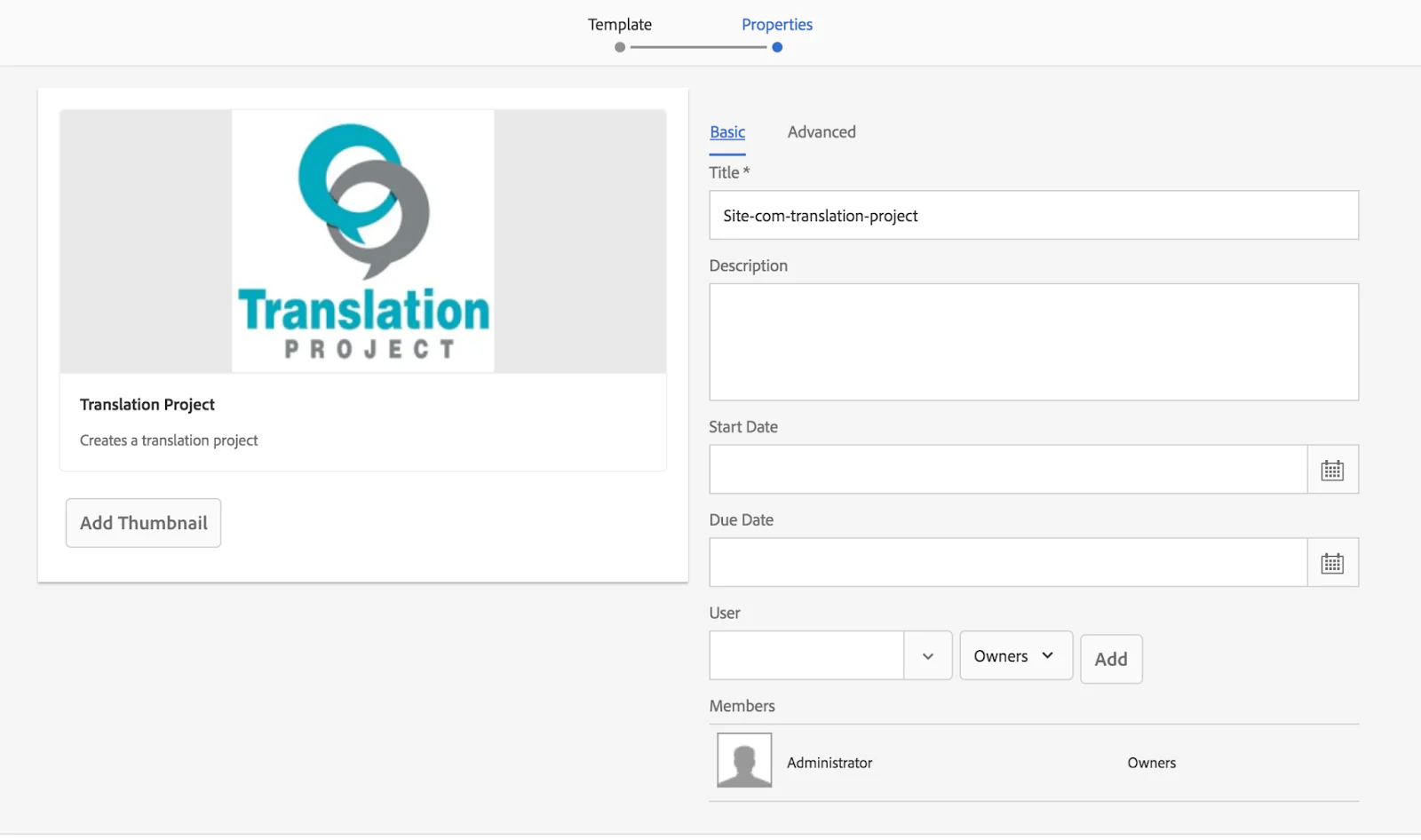
Advanced tab:
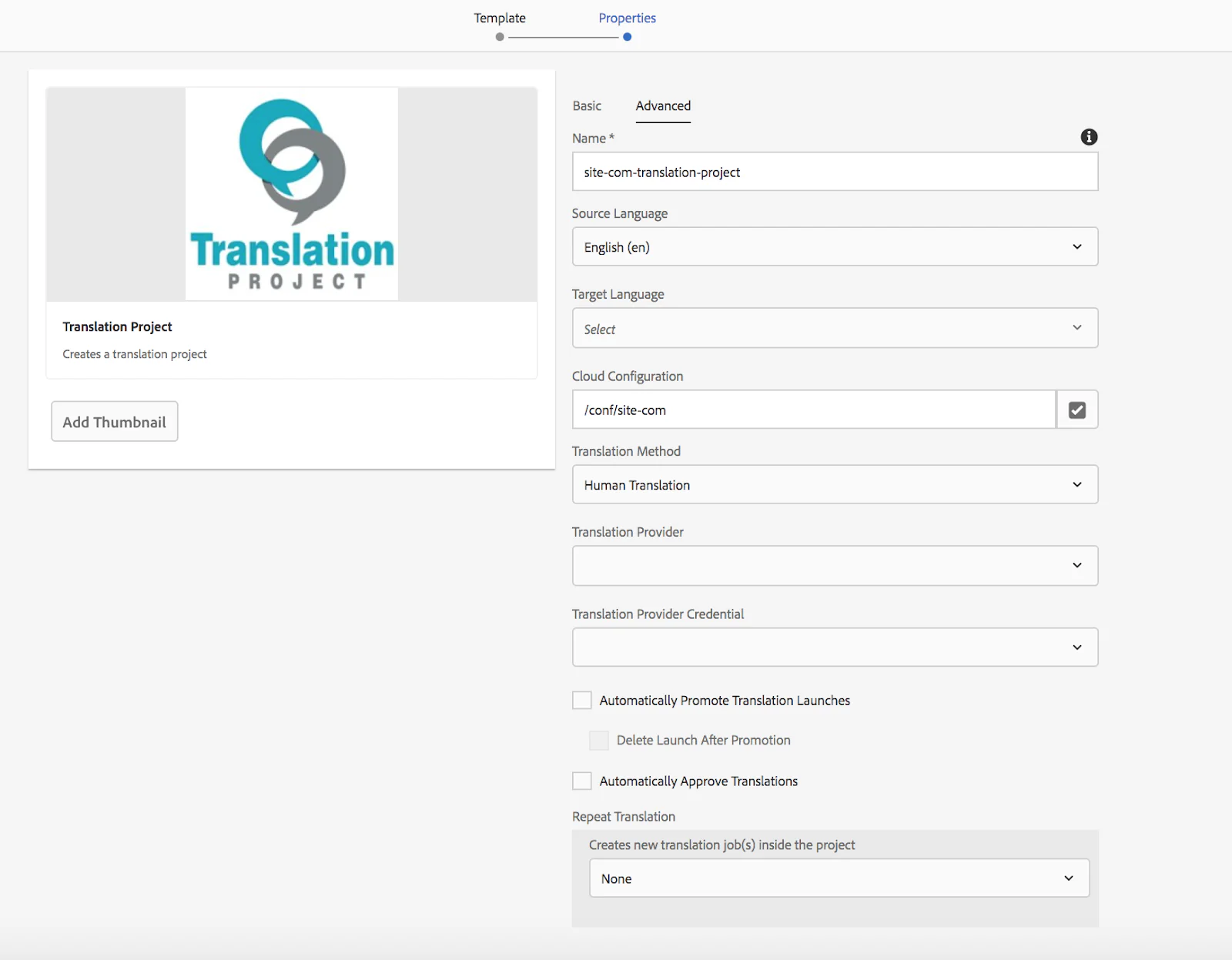
- You can also select a thumbnail
- Click Create
This project will be used later when creating/updating language copies.
AEM Content Fragment Localization Workflows
In the CF console, we can create a language copy, update a language copy (all variations), and update a particular AEM Content Fragment variation. A corresponding workflow in AEM is being triggered with each action.
We will create a Workflow step process to extend built-in AEM workflows. It will have a param: SELECTED_REGIONS_ARG_NAME = “regions” – an array of regions where you can perform link localization. The workflow will search for site and XF references within the CF and try to localize them. For this WF, we will use code from this https://exadel.com/news/aem-experience-fragments-rollout-configuration/ article: XFReferencesUpdateActionFactory and SiteReferencesUpdateActionFactory.
package com.wcm.site.workflow;

import com.adobe.acs.commons.util.WorkflowHelper;
import com.adobe.granite.workflow.WorkflowSession;
import com.adobe.granite.workflow.exec.WorkItem;
import com.adobe.granite.workflow.exec.WorkflowProcess;
import com.adobe.granite.workflow.metadata.MetaDataMap;
import com.day.cq.dam.api.DamConstants;
import com.day.cq.wcm.msm.api.LiveRelationshipManager;
import com.google.common.collect.ImmutableSet;
import com.wcm.site.localization.Locale;
import com.wcm.site.localization.PathContext;
import com.wcm.site.xf.SiteReferencesUpdateActionFactory;
import com.wcm.site.xf.ReferencesUpdateAction;
import com.wcm.site.xf.XFReferencesUpdateActionFactory;
import org.apache.commons.lang3.StringUtils;
import org.apache.sling.api.resource.Resource;
import org.apache.sling.api.resource.ResourceResolver;
import org.osgi.service.component.annotations.Component;
import org.osgi.service.component.annotations.Reference;
import org.slf4j.Logger;
import org.slf4j.LoggerFactory;

import javax.jcr.RepositoryException;
import java.util.Arrays;
import java.util.Collections;

import static com.wcm.site.servlets.RolloutWorkflowStarter.SELECTED_REGIONS_ARG_NAME;
import static com.wcm.site.util.AssetUtils.getTargetLanguageCopyPath;
import static com.wcm.site.util.CFMUtils.isContentFragment;
import static com.wcm.site.util.LinkUtils.joinAsPath;
import static com.wcm.site.workflow.WorkflowProcessBase.WORKFLOW_PROCESS_LABEL;

@Component(immediate = true, service = WorkflowProcess.class, property = {
        WORKFLOW_PROCESS_LABEL + "=Content Fragment Links Localisation" })
public class ContentFragmentLinkLocalisationProcess extends WorkflowProcessBase implements WorkflowProcess {
    private static final Logger LOG = LoggerFactory.getLogger(ContentFragmentLinkLocalisationProcess.class);

    @Reference
    private WorkflowHelper workflowHelper;

    @Reference
    private LiveRelationshipManager liveRelationshipManager;

    @Override
    public void execute(WorkItem workItem, WorkflowSession workflowSession, MetaDataMap metaData) {
        ResourceResolver resourceResolver = getResourceResolver(workflowHelper, workflowSession);

        String sourcePath = getTargetPath(workItem, true);
        String selectedRegions = getPersistedData(workItem, SELECTED_REGIONS_ARG_NAME, StringUtils.EMPTY);
        if (StringUtils.isEmpty(selectedRegions)) {
            processRegion(sourcePath, resourceResolver);
            return;
        }

        Arrays.stream(StringUtils.split(selectedRegions, ";")).forEach(language ->
                processRegion(getTargetLanguageCopyPath(sourcePath, language, resourceResolver, null), resourceResolver)
        );
    }

    public void processRegion(String sourcePath, ResourceResolver resourceResolver) {
        Resource source = resourceResolver.getResource(sourcePath);
        PathContext sourcePathContext = new PathContext(sourcePath);
        if (source == null || !isContentFragment(source)) {
            LOG.error("Resource not found or not content fragment {}", sourcePath);
            return;
        }

        SiteReferencesUpdateActionFactory.SiteReferencesUpdateAction siteReferencesUpdateAction = new SiteReferencesUpdateActionFactory.SiteReferencesUpdateAction(liveRelationshipManager, Collections.emptyList());
        XFReferencesUpdateActionFactory.XFReferencesUpdateAction xfReferencesUpdateAction = new XFReferencesUpdateActionFactory.XFReferencesUpdateAction();
        Arrays.stream(PathContext.Site.values()).forEach(site -> {
                    adjustReferences(siteReferencesUpdateAction, site.getBlueprintPath(), source, Locale.lookupByIsoLocale(sourcePathContext.getLocaleSegment(), null));
                    adjustReferences(xfReferencesUpdateAction, joinAsPath(site.getCfPath(), java.util.Locale.ENGLISH.getLanguage()), source, Locale.lookupByIsoLocale(sourcePathContext.getLocaleSegment(), null));
                }
        );
    }

    private void adjustReferences(ReferencesUpdateAction action, String source,
                             Resource target, Locale language) {
        if (target == null || language == null) {
            LOG.error("target or language is null, exiting ...");
            return;
        }

        try {
            ResourceResolver resourceResolver = target.getResourceResolver();
            action.adjustReferences(
                    resourceResolver.getResource(source),
                    resourceResolver.getResource(target.getPath()),
                    language.name(),
                    false,
                    ImmutableSet.of(DamConstants.PN_PARENT_PATH, "cq:translationSourcePath"));
        } catch (RepositoryException e) {
            LOG.error("Exception", e);
        }
    }
}
A starter:
package com.wcm.site.workflow;

import com.adobe.acs.commons.util.WorkflowHelper;
import com.adobe.acs.commons.util.visitors.TraversalException;
import com.adobe.acs.commons.util.visitors.TreeFilteringResourceVisitor;
import com.adobe.granite.workflow.WorkflowSession;
import com.adobe.granite.workflow.exec.WorkItem;
import com.adobe.granite.workflow.exec.WorkflowData;
import com.adobe.granite.workflow.exec.WorkflowProcess;
import com.adobe.granite.workflow.metadata.MetaDataMap;
import com.wcm.site.util.AssetUtils;
import org.apache.commons.lang3.StringUtils;
import org.apache.sling.api.resource.Resource;
import org.apache.sling.api.resource.ResourceResolver;
import org.osgi.service.component.annotations.Component;
import org.osgi.service.component.annotations.Reference;
import org.slf4j.Logger;
import org.slf4j.LoggerFactory;

import java.util.Arrays;

import static com.wcm.site.util.AssetUtils.TRANSLATE_LANGUAGES_KEY_NAME;
import static com.wcm.site.util.AssetUtils.getTargetLanguageCopyPath;
import static com.wcm.site.util.CFMUtils.isContentFragment;
import static com.wcm.site.workflow.WorkflowProcessBase.WORKFLOW_PROCESS_LABEL;


@Component(immediate = true, service = WorkflowProcess.class, property = {
       WORKFLOW_PROCESS_LABEL + "=Content Fragment Localisation Workflow Starter" })
public class ContentFragmentLocalisationWFStarterProcess extends WorkflowProcessBase implements WorkflowProcess {
   public static final String WF_MODEL_ID_ARG_NAME = "modelId";
   private static final Logger LOG = LoggerFactory.getLogger(ContentFragmentLocalisationWFStarterProcess.class);


   @Reference
   private WorkflowHelper workflowHelper;

   @Override
   public void execute(WorkItem workItem, WorkflowSession workflowSession, MetaDataMap metaData) {
       ResourceResolver resourceResolver = getResourceResolver(workflowHelper, workflowSession);
       String sourcePath = getTargetPath(workItem, true);
       Resource source = resourceResolver.getResource(sourcePath);

       if (AssetUtils.isFolder(source)) {
           processFolder(workItem, workflowSession, metaData, source);
           return;
       }

       processCF(workItem, workflowSession, metaData, source);
   }

   private void processCF(WorkItem workItem, WorkflowSession workflowSession, MetaDataMap metaData, Resource source) {
       if (source == null || !isContentFragment(source)) {
           return;
       }

       ResourceResolver resourceResolver = getResourceResolver(workflowHelper, workflowSession);
       WorkflowData data = workItem.getWorkflowData();
       MetaDataMap metaDataMap = data.getMetaDataMap();

       String updateLanguages = metaDataMap.get(TRANSLATE_LANGUAGES_KEY_NAME, StringUtils.EMPTY);
       String[] updateLanguagesArr = StringUtils.split(updateLanguages, ";");

       String[] args = buildArguments(metaData);
       String modelId = getArgValueByName(workflowHelper, args, WF_MODEL_ID_ARG_NAME);

       if (StringUtils.isEmpty(modelId)) {
           LOG.error("Workflow model id is not found");
           return;
       }

       Arrays.stream(updateLanguagesArr).forEach(language ->
               startWorkflow(workflowSession, modelId, getTargetLanguageCopyPath(source.getPath(), language, resourceResolver, null))
       );
   }


   private void processFolder(WorkItem workItem, WorkflowSession workflowSession, MetaDataMap metaData, Resource source) {
       try {
           TreeFilteringResourceVisitor cfVisitor = new TreeFilteringResourceVisitor();
           cfVisitor.setTraversalFilter(resource -> cfVisitor.isFolder(resource) || isContentFragment(resource));
           cfVisitor.setResourceVisitor((resource, level) -> processCF(workItem, workflowSession, metaData, resource));

           cfVisitor.accept(source);
       } catch (TraversalException e) {
           LOG.error("Exception", e);
       }
   }
}
And the workflow itself /var/workflow/models/site/cf-localisation-workflow.xml:
<?xml version="1.0" encoding="UTF-8"?>
<jcr:root xmlns:sling="http://sling.apache.org/jcr/sling/1.0" xmlns:cq="http://www.day.com/jcr/cq/1.0" xmlns:jcr="http://www.jcp.org/jcr/1.0" xmlns:nt="http://www.jcp.org/jcr/nt/1.0"
    jcr:primaryType="cq:WorkflowModel"
    sling:resourceType="cq/workflow/components/model"
    description="No Description"
    title="Site Content Fragment Localisation Workflow">
    <metaData
        cq:generatingPage="/conf/global/settings/workflow/models/site/cf-localisation-workflow/jcr:content"
        cq:lastModified="{Long}1611255928586"
        cq:lastModifiedBy="admin"
        jcr:primaryType="nt:unstructured"/>
    <nodes jcr:primaryType="nt:unstructured">
        <node0
            jcr:primaryType="cq:WorkflowNode"
            title="Start"
            type="START">
            <metaData jcr:primaryType="nt:unstructured"/>
        </node0>
        <node1
            jcr:primaryType="cq:WorkflowNode"
            title="Content Fragment Links Localisation Step"
            type="PROCESS">
            <metaData
                jcr:primaryType="nt:unstructured"
                PROCESS="com.wcm.site.workflow.ContentFragmentLinkLocalisationProcess"
                PROCESS_AUTO_ADVANCE="true"/>
        </node1>
        <node2
            jcr:primaryType="cq:WorkflowNode"
            title="End"
            type="END">
            <metaData jcr:primaryType="nt:unstructured"/>
        </node2>
    </nodes>
    <transitions jcr:primaryType="nt:unstructured">
        <node0_x0023_node1
            jcr:primaryType="cq:WorkflowTransition"
            from="node0"
            rule=""
            to="node1">
            <metaData jcr:primaryType="nt:unstructured"/>
        </node0_x0023_node1>
        <node1_x0023_node2
            jcr:primaryType="cq:WorkflowTransition"
            from="node1"
            rule=""
            to="node2">
            <metaData jcr:primaryType="nt:unstructured"/>
        </node1_x0023_node2>
    </transitions>
</jcr:root>
Creating a New Language Copy in AEM
To create a new language copy:
- Select a CF in a blueprint folder
- Click References → Language Copies
- Select Create and Translate
- Select a language to translate to
- Select create structure only → Create
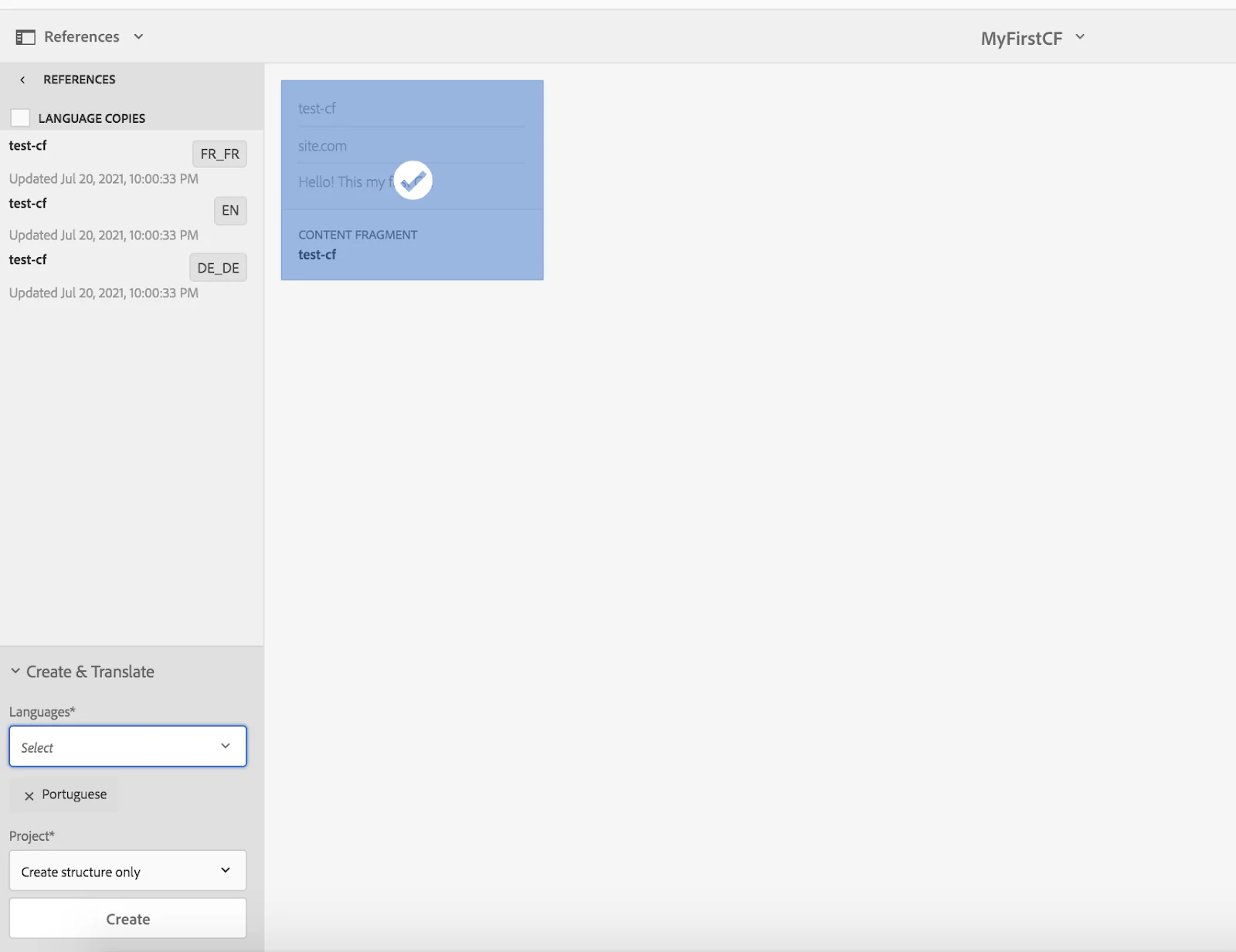
After this, ‘/libs/settings/workflow/models/dam/dam-create-language-copy’ workflow will be triggered in AEM. We need to extend this WF by adding an extra step, which will localize all links within a CF.
Adding a new step to the “DAM Create Language Copy” workflow /var/workflow/models/dam/dam-create-language-copy.xml:
<?xml version="1.0" encoding="UTF-8"?>
<jcr:root xmlns:sling="http://sling.apache.org/jcr/sling/1.0" xmlns:cq="http://www.day.com/jcr/cq/1.0" xmlns:jcr="http://www.jcp.org/jcr/1.0" xmlns:nt="http://www.jcp.org/jcr/nt/1.0"
    jcr:primaryType="cq:WorkflowModel"
    sling:resourceType="cq/workflow/components/model"
    description="This workflow creates language copies for assets"
    title="DAM Create Language Copy">
    <metaData
        cq:generatingPage="/conf/global/settings/workflow/models/dam/dam-create-language-copy/jcr:content"
        cq:lastModified="{Long}1610816350558"
        cq:lastModifiedBy="admin"
        jcr:primaryType="nt:unstructured"/>
    <nodes jcr:primaryType="nt:unstructured">
        <node0
            jcr:primaryType="cq:WorkflowNode"
            title="Start"
            type="START">
            <metaData jcr:primaryType="nt:unstructured"/>
        </node0>
        <node1
            jcr:primaryType="cq:WorkflowNode"
            description="Creates language copy of assets"
            title="Create Language Copy"
            type="PROCESS">
            <metaData
                jcr:primaryType="nt:unstructured"
                PROCESS="com.day.cq.dam.core.impl.process.CreateAssetLanguageCopyProcess"
                PROCESS_AUTO_ADVANCE="true"/>
        </node1>
        <node2
            jcr:primaryType="cq:WorkflowNode"
            title="Content Fragment Localisation WFs Starter"
            type="PROCESS">
            <metaData
                jcr:primaryType="nt:unstructured"
                PROCESS="com.wcm.site.workflow.ContentFragmentLocalisationWFStarterProcess"
                PROCESS_ARGS="modelId:/var/workflow/models/site/cf-localisation-workflow"
                PROCESS_AUTO_ADVANCE="true"/>
        </node2>
        <node3
            jcr:primaryType="cq:WorkflowNode"
            title="End"
            type="END">
            <metaData jcr:primaryType="nt:unstructured"/>
        </node3>
    </nodes>
    <transitions jcr:primaryType="nt:unstructured">
        <node0_x0023_node1
            jcr:primaryType="cq:WorkflowTransition"
            from="node0"
            rule=""
            to="node1">
            <metaData jcr:primaryType="nt:unstructured"/>
        </node0_x0023_node1>
        <node1_x0023_node2
            jcr:primaryType="cq:WorkflowTransition"
            from="node1"
            rule=""
            to="node2">
            <metaData jcr:primaryType="nt:unstructured"/>
        </node1_x0023_node2>
        <node2_x0023_node3
            jcr:primaryType="cq:WorkflowTransition"
            from="node2"
            to="node3">
            <metaData jcr:primaryType="nt:unstructured"/>
        </node2_x0023_node3>
    </transitions>
</jcr:root>
This should be enough to get you started, but it’s only part one of our series. In part two, we will take a look at how to configure links by rewriting a CF Language Copy update and CF Single Variation update.
Author: Iryna Ason